
Desk Setup Tips for Focus and Comfort: Create Your Ideal Workspace
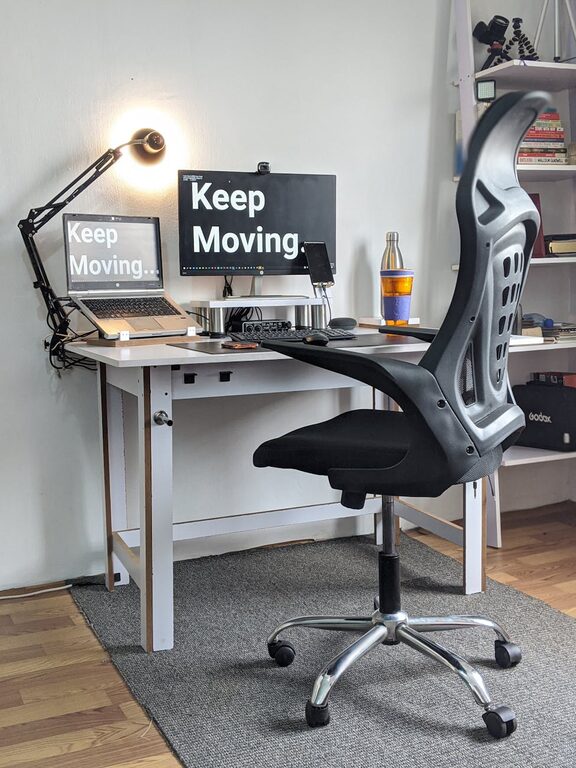
Creating a workspace that promotes both focus and comfort is key to staying productive throughout the day. Whether you work from home, study, or spend many hours at your desk, the way you arrange your environment can significantly impact your well-being and efficiency.
In this blog post, we’ll explore practical desk setup tips that help you maintain concentration while keeping physical comfort in check. These simple changes can make a big difference in how you feel and perform.
Why Your Desk Setup Matters
A well-organized and ergonomic workspace reduces distractions and minimizes physical strain. When your desk promotes comfort, you’re less likely to experience fatigue, discomfort, or soreness. Plus, a neat space can help clear your mind, making it easier to focus on tasks.
When setting up your desk, consider both the functional and aesthetic aspects. Your setup should invite productivity and support healthy posture.
Choosing the Right Desk and Chair
Desk Height and Size
– Height: Your desk should be at a height where your forearms rest comfortably parallel to the floor when typing or writing. Standard desks are usually around 28-30 inches high, but adjustable desks offer more flexibility.
– Size: Choose a desk size that fits your space but also provides enough room for your essentials without crowding. A cluttered desk can lead to distractions.
Ergonomic Chair
– An ergonomic chair supports your lower back, promotes proper posture, and reduces the risk of back pain.
– Look for chairs with adjustable height, lumbar support, and comfortable cushioning.
– Your feet should rest flat on the floor or on a footrest, and your knees should be at about a 90-degree angle.
Positioning Your Monitor and Equipment
Monitor Placement
– Position your monitor about an arm’s length away.
– The top of the screen should be at or just below eye level. This helps prevent neck strain.
– If you use multiple monitors, keep the primary one directly in front of you.
Keyboard and Mouse Setup
– Place your keyboard and mouse close enough to avoid reaching.
– Keep your wrists straight and elbows close to your body.
– Consider a wrist rest if you type for long hours.
Lighting for Comfort and Focus
– Use natural light when possible, but avoid glare on your screen.
– Position your desk near a window or use daylight bulbs.
– Supplement with task lighting such as an adjustable desk lamp, especially for evening work.
– Proper lighting reduces eye strain and keeps you alert.
Organizing Your Desk for Productivity
Declutter Regularly
– Keep only essentials on your desk.
– Use organizers, trays, or drawers to store supplies.
– A tidy desk helps maintain mental clarity.
Personal Touches
– Add plants, photos, or artwork to make your workspace inviting.
– Choose items that inspire you but avoid too many distractions.
Incorporate Movement and Breaks
– Use a sit-stand desk if possible to alternate between sitting and standing.
– Take short breaks every hour to stretch or walk.
– Movement helps reduce stiffness and refreshes your mind.
Cable Management and Technology
– Use cable organizers or clips to keep cords tidy.
– A wireless keyboard and mouse can reduce clutter.
– Position charging stations within easy reach to keep devices powered.
Additional Comfort Tips
– Keep a water bottle at your desk to stay hydrated.
– Use noise-canceling headphones if your environment is noisy.
– Adjust room temperature and ventilation for comfort.
Final Thoughts
Designing your desk setup with focus and comfort in mind doesn’t have to be complicated. By paying attention to ergonomic principles, lighting, organization, and personal preferences, you can create a workspace that supports both health and productivity. Small adjustments can lead to big improvements in how you work and feel throughout the day.
Start with one or two changes and build your ideal workspace step by step. Your body and mind will thank you!